Retro Rabbit Holes Ep. #1 - Rogue's Abandoned Hall of Fame
Published: 2026-11-07 | Updated: 2026-11-15
This story started with a missing high score and ended with a 1981 file "API", a filesystem from 1996, and the slightly absurd conclusion that in certain cases FreeDOS runs an old MS-DOS game better than MS-DOS does. Who would have thought?
Meet Rogue
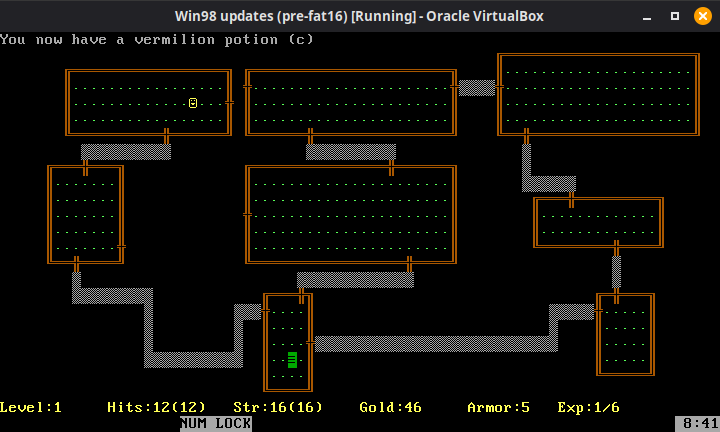
Rogue: Explored Level 1
Rogue is the grandfather of an entire genre. Michael Toy and Glenn Wichman wrote it on Unix around 1980, with Ken Arnold joining in later. You, as the player, go down into the Dungeons of Doom, fight letters of the alphabet that are actually monsters, and try to bring back the Amulet of Yendor. The levels are procedurally generated and death is permanent (spoiler: you will die a lot). Every "roguelike" since is named after this game.
The IBM PC version came from A.I. Design, a small company founded by Michael Toy and Jon Lane to port Rogue to the PC — little did they know back then that decades later A.I. would be used to reverse engineer their product in hopes of fixing things. The irony! At first they packaged and sold it themselves until around 1984 Epyx took over marketing and commissioned ports to the Macintosh, Amiga and Atari ST. The PC version swapped the Unix letters for the PC's extended character set: smiley-face hero ☺, box-drawing walls, little suns for gold. The title screen reads "Adapted for the IBM PC by: Jon Lane", and every gravestone it draws is dated 1983. (That's not a clock bug, by the way, at least according to Claude: the original Unix Rogue engraves the current year, but the PC port simply has the year "1983" baked into its tombstone, right below "REST IN PEACE".)
Two features are broken on later versions of MS-DOS (all tests were done with Rogue version 1.1):
- Saving: Press S and the game writes your current game to
rogue.savso you can continue later. - The Hall of Fame: If your character dies, the game shows a gravestone, "REST IN PEACE ... killed by a <monster of the day>", and then "[Press Enter to see rankings]". The scores live in a so-called "scorefile",
ROGUE.SCR, a small file next to the game's executable.
The "Bug"
...or can it even be considered one in the true sense? Why I even found this error is an entirely different story: I wanted to let an LLM play Rogue, but that's a topic for an upcoming article (small teaser!). First, Rogue had a real problem to be dealt with, or at least investigated, because things like these tend to keep me up at night. The error made itself known after every death: instead of the rankings, it showed:
No scorefile: Create Retry Abort
Retry: Same message, the score sadly was never written. :-(
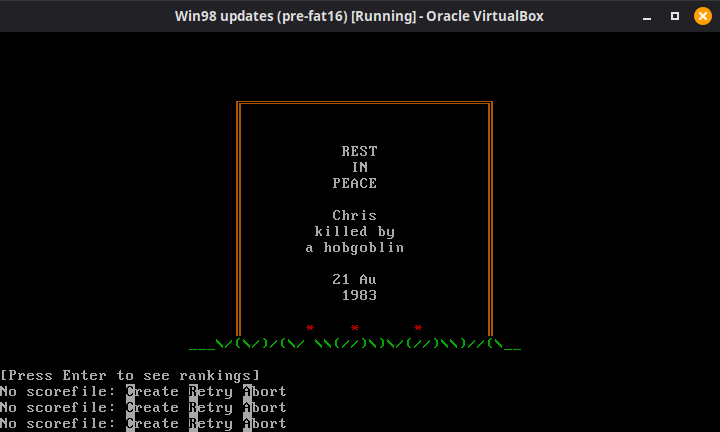
As if being killed by a hobgoblin is not enough, you are denied a place in the Hall of Fame. (R)etry or (C)reate all you want, it's no use. Mission Abort!
Down the Rabbit Hole
I handed the quest to Claude (my trusty AI clanker at the moment), with a clear mission: dig deep into the machine code of ROGUE.EXE. No editing or patching, just figure out why.
Claude started where any sane reverse engineer would: with the strings in the game's executable. Right next to each other were [Press Enter to see rankings], rogue.scr and the error message No scorefile: %iCreate %iRetry %iAbort. (Plus a little bonus string, (Mr. Mctesq was here), possibly a cracker's signature? In my legally acquired copy, how could this be? Shout out to Mr. Mctesq!) Anyway, from there, the disassembler found the score routine: open rogue.scr for reading and writing and if that fails, show the Create/Retry/Abort prompt.
The interesting part was in the game's built-in C library. To open a file, it uses the original DOS 1.x way: it fills in a small 37-byte structure in memory, a File Control Block (FCB), and calls DOS function 0Fh, "open file using FCB". Create, read, write, close and delete all go through FCBs too.
That was a big clue. And as it turns out, it wasn't just the scores: savegames were broken too. If you press Shift+S to save the game, Rogue answers with "Could not creat rogue.sav". That's not a typo, btw: creat is the old Unix name of the "create file" function, and the game's message uses it. Apparently here lies some ancient Unix lore, which Claude just unearthed from the machine code. How nice! For debugging we now had a mechanism to reproduce the bug much easier than letting your character get killed over and over. (yeah, I know, as if that's not the default mode when playing this game...)
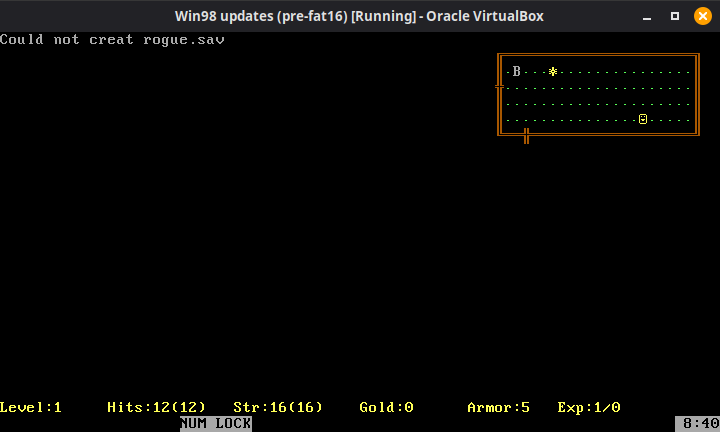
Ten seconds into a new game, and saving already fails.
The next step was to cut the game out of the picture. Claude chose good old DEBUG.EXE and typed in four assembly instructions that make exactly the call Rogue makes: FCB open on ROGUE.SCR. DOS answered AL=FF (translation: epic fail).
So DOS itself refused to open files on drive C: this way. One CHKDSK later the culprit was clear: C: has 470,560 clusters of 4 KB each. FAT16 can't have more than 65,524 clusters. C: must be FAT32!
To make sure, I also confirmed the bug on real hardware with MS-DOS 7.1 and two partitions: Rogue saves fine on FAT16 and fails on FAT32. Same DOS, same game, different filesystem.
A quick history of FCBs
An FCB, or File Control Block, is how programs talked to files in the very first MS-DOS, version 1.0 from 1981. It was copied almost directly from CP/M, the 8-bit operating system that DOS imitated, so that CP/M software could be ported quickly.
The concept: the program reserves a small block of memory, writes the drive letter and an 8.3 filename into it (as ROGUE SCR, padded with spaces, no dot), and passes it to DOS. DOS uses the rest of the block as scratch space to keep track of the open file. DOS 1 had no folders at all, so there was nothing more to say.
Then came MS-DOS 2.0 in 1983, built for the IBM PC XT and its hard disk. It brought sub-directories and, with them, a new Unix-style API: file handles. You pass a full path like C:\GAMES\ROGUE\ROGUE.SCR, DOS gives you back a small number, and you use that number to read, write and close while DOS does the bookkeeping. FCBs couldn't handle paths, so from then on they were the legacy option. Microsoft kept them for compatibility and encouraged everyone to use handles. By the late 1980s practically every program did.
Except, of course, the ones written for DOS 1. Rogue's built-in library was meant to run on the original IBM PC with DOS 1.x, so it used FCBs, which I'd say was a perfectly reasonable decision in 1983.
Why FAT16 yay, FAT32 nay?
FAT32 arrived in 1996 with Windows 95 OSR2 (MS-DOS 7.1) and became mainstream with Windows 98. On FAT32 drives, MS-DOS simply refuses FCB file calls. The classic DOS reference, Ralf Brown's Interrupt List, also notes it: on FAT32, FCB file I/O isn't supported. On FAT12 and FAT16 drives, the very same DOS still handles FCBs exactly as it always did. Nothing was removed, FAT32 was simply left out.
To my knowledge, Microsoft never explained the decision, so here are some of Claude's speculations (take them with a grain of salt):
The technical side: the FCB is a fixed 37-byte structure, and DOS uses a few reserved bytes in it for its own notes about the open file, including where the file starts on disk. Those notes are 16-bit numbers. There's also a nasty trick: DOS only keeps a small pool of slots for FCB files (FCBS= in CONFIG.SYS), and when the pool is full it quietly closes the oldest one. When the program uses that FCB again, DOS reopens the file from the numbers stored in the FCB. FAT32 cluster numbers need 28 bits. They don't fit. Making it work would have meant a new FCB layout (breaking every program that knows the old one) or a hidden table inside DOS.
The economic side: by 1996, FCBs had been obsolete for thirteen years. FAT32 shipped preinstalled on new PCs, for Windows 95 and its programs, which never touched FCBs. FAT32 broke a few other low-level DOS features anyway, so disk utilities needed updates regardless. And FAT32 was optional: anyone with old software could keep a FAT16 partition.
So it wasn't an oversight: rewriting an ancient data structure for a handful of DOS 1-era programs just wasn't worth it, maybe.
FreeDOS does it better
Obviously, I had to know how FreeDOS deals with this, so I tried it. Rogue saved without a hitch on FreeDOS 1.4, on a FAT32 partition - lol.
FreeDOS is open source, so Claude could check (or hallucinate ☺) why instead of guessing. In the kernel (kernel/fcbfns.c), the FCB open function hands the filename to DosOpenSft(), the very same internal routine the modern handle-based open uses. The only thing it writes into the FCB is a small index into DOS's table of open files. Reads and writes go through the normal file code, too, which knows all about FAT32. There's no FAT32 check anywhere in the FCB code.
The difference: MS-DOS stores where the file sits on disk inside the FCB, so it can close and reopen the file behind the program's back and FAT32 numbers don't fit in there. In FreeDOS, an FCB is more like a thin wrapper around a normal open file: DOS keeps track of the file in its own table, and the FCB only holds a pointer into that table.
Is this only Rogue's problem?
Nope, any DOS program that uses FCBs for its own files will run into this on a FAT32 partition under MS-DOS 7.1. That mostly means:
- programs from the DOS 1 era, roughly 1981 to 1984, when FCBs were the only way to access files
- early ports from CP/M, which used FCBs natively
- programs built with early compilers whose runtime libraries still used FCBs, as Rogue's does
Which DOS versions are affected? MS-DOS 7.0 from the first Windows 95 can't be, because it doesn't know FAT32 at all. MS-DOS 7.1 (Windows 95 OSR2 and Windows 98) is, and MS-DOS 8.0 from Windows Me very likely is, too.
The symptom is a bit sneaky: a game starts and plays fine, because DOS loads programs with modern calls. It only breaks when the program is trying to write to files, e.g. for keeping a list of high scores. If an early-80s game on a Windows 98 machine "can't save", FAT32 is the prime suspect. Self-booting games, which skip DOS entirely, and pretty much anything from the late 1980s onward aren't affected.
What to do?
Well, two obvious options: a) use FreeDOS or b) keep a FAT16 partition on MS-DOS. Either way, it's nice to know the cause. Thanks, Claude!
Update on 2026-11-15: At least for Rogue, it turns out later versions published by Epyx (1.4x+) don't use FCBs anymore, but were updated to make use of regular file handle calls, so they work on MS-DOS 7.1 with FAT32 again!
- Chris
Note: AI was used to help analyze ROGUE.EXE and phrase this article.


